
TetriStation 21.0 - Download
You'll be able to download in few seconds.
Publisher Description
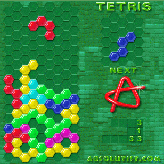
TetriStation 2 is a pack of 18 different tetris-like games, with different blocks, grids,
strategies and logic. This is a real tetris jukebox! It adds high resolution graphics - 320x320 and 65,000 colors. Some of the games are the all-time classics, some are completely new and untasted. Get a whole score of games, a dollar apiece! All your best results are submitted to the server and take part in the World-wide contest.
The 7 days' trial period is free. In the registered game:
- three skill levels of different difficulty, even kids can have fun;
- 18 different games for every imaginable taste;
- three different shapes of blocks: Squares, Hexagons, Triangles;
- six modes of the game - Tetris, Pentix, Columns, Pictrix, Blocktris, Mosaic;
- Tune various options to your taste;
- your best results are saved, and can take part in the Web-contest for top players;
- runs on the systems based on PalmOS 4.0 and later platforms that support screen resolution 320x320 and 65000 colors: Sony Clie PEG-SJ30, PEG-T665C, PEG-T650C, PEG-NR70, PEG-NR70V, PEG-T600C, PEG-T615C, PEG-T625C, PEG-N770C, PEG-N760C, PEG-N750C, PEG-N610C, PEG-NZ90, PEG-NX70V, PEG-NX60.
This game works also under PalmOS 5.0 and later: Palm Tungsten T and others coming in the near future.
- Free technical support by e-mail
About TetriStation 2
This program is available in English. It was last updated on 29 September, 2026. TetriStation 2 is compatible with the following operating systems: Other.
The company that develops TetriStation 2 is Absolutist.com. The latest version released by its developer is 1.0.
The download we have available for TetriStation 2 has a file size of 1.0 MB. Just click the green Download button above to start the downloading process. The program is listed on our website since 2003-08-01 and was downloaded 0 times. We have already checked if the download link is safe, however for your own protection we recommend that you scan the downloaded software with your antivirus. Your antivirus may detect the TetriStation 2 as malware if the download link is broken.
How to install TetriStation 2 on your Windows device:
- Click on the Download button on our website. This will start the download from the website of the developer.
- Once the TetriStation 2 is downloaded click on it to start the setup process (assuming you are on a desktop computer).
- When the installation is finished you should be able to see and run the program.
Program Details
System requirements
Download information
Pricing
Version History
version 1.0
posted on 2003-08-01
Disclaimer
External Download
We do not host TetriStation 2 on our servers. We did not scan it for viruses, adware, spyware or other type of malware. This app is hosted by the software publisher and passed their terms and conditions to be listed there. We recommend caution when installing it.
The external download link for TetriStation 2 is provided to you by apps112.com without any warranties, representations or guarantees of any kind, so access it at your own risk.
If you have questions regarding this particular app contact the publisher directly. For questions about the functionalities of apps112.com contact us.
